Why (do we need to talk about) (Spatial) Database
Data Management and Organization: Spatial databases play a crucial role in managing, storing, and querying large volumes of geospatial data. A solid understanding of spatial databases helps geovisualization professionals effectively organize and access data, ensuring efficient workflows and accurate analysis.
Data Retrieval and Query Performance: Geovisualization often involves working with complex spatial queries and data retrieval tasks. By discussing spatial databases, students can learn how to optimize these queries and improve performance, resulting in faster and more efficient data retrieval for visualization purposes.
Data Quality and Consistency: Spatial databases provide tools and techniques for maintaining data quality, consistency, and integrity. This knowledge is vital for geovisualization professionals, as data quality directly impacts the accuracy and reliability of their visualizations.
Data Analysis and Modeling: Spatial databases support various geospatial analysis and modeling techniques, such as spatial statistics, spatial interpolation, and geostatistics. A strong foundation in spatial databases allows geovisualization professionals to leverage these advanced methods and create more informative visualizations.
About Data Management
How do you manage your photos?
Most cellphones take nice photos
Taking 3 photos a day will give you ~1,000 photos a year
Taking a 5-day vacation would give you 200 photos
Ways to managing photos
Leave them on the phone?
Organize them into folders?
Upload them to some cloud services?
Which method is the best?

Figure 1:Sultan Mosque, Singapore. Photo by Charles Postiaux on Unsplash
Managing photos is very similar to the way of managing data, and vice versa.
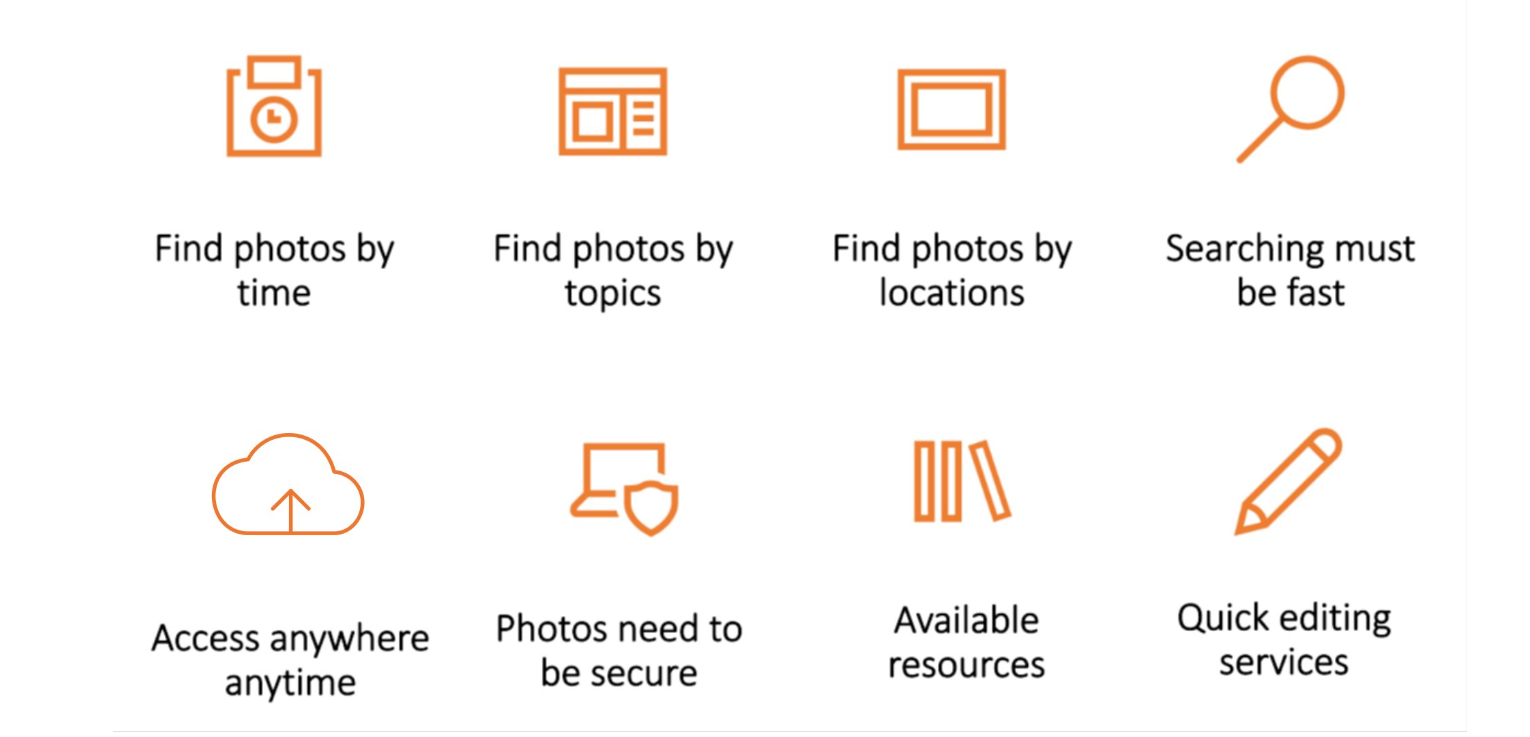
The photo management.
Data Management
Definition (Oracle)
Data management is the practice of collecting, keeping, and using data securely, efficiently, and cost-effectively.
help people, organizations, and connected things
optimize the use of data within the bounds of policy and regulation
(use data to) enable data-driven decision-makings and take actions that maximize the benefit to the organisation
Database Operations - CRUD
_C_reate: The Create operation is used to add new records (or rows) to a database table.
_R_ead: The Read operation is used to retrieve or fetch existing records from a database table.
_U_pdate: The Update operation is used to modify existing records in a database table.
_D_elete: The Delete operation is used to remove existing records from a database table.
What is Database and Spatial Database
Database: an integrated set of data on a particular subject, which is often used to store, and organize data
Spatial (or Geographic) database: database containing geographic data of a particular subject for a particular area
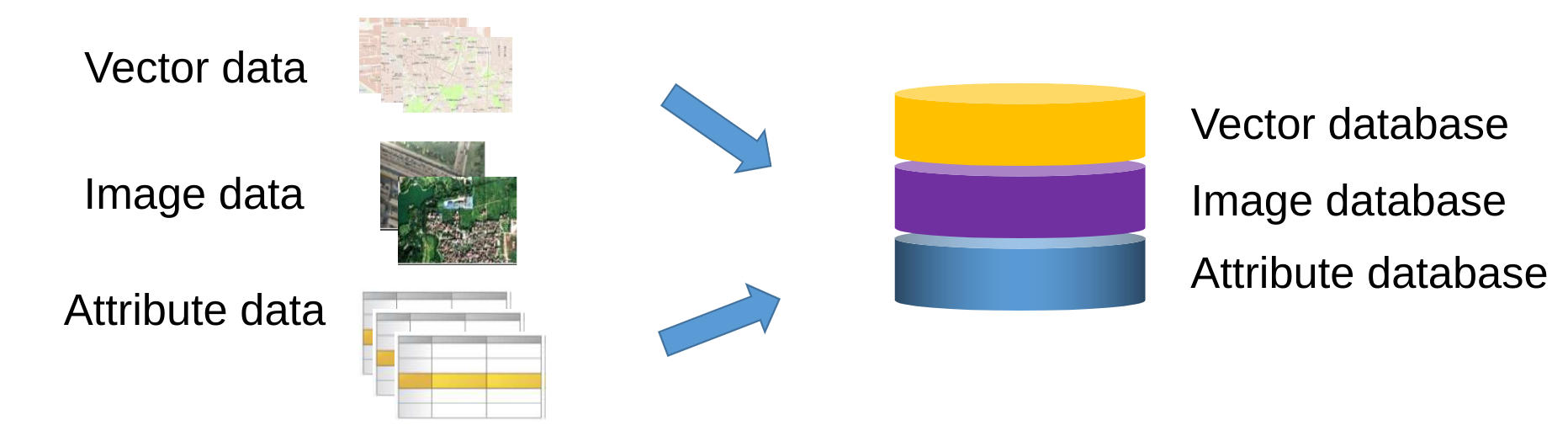
Spatial Database
Characteristics of (spatial) database
Data is under centralized control
Can guarantee data sharing among different users and applications
Different from file management in which files are dispersed
Data are independent
Database is independent of the application systems, and thus can be called by various application systems
Data redundancy is small
Avoid repetitive data storage
Improve data usage efficiency
Database has complex data model structure
The complex data model structure is used for data organization and data management
Vital difference from file management
Database has the function of data protection
A password and permission for access must be set
class: left, middle
Database Management Systems (DBMS)
A system to perform database operations on tables
CRUD (Create, Read, Update, Delete)
providing a systematic way to store, organize, retrieve, and manipulate data.
It ensures data consistency, integrity, and security while enabling efficient access and data sharing among multiple users or applications.
A DBMS supports various database models and provides features like backup, recovery, and performance optimization for effective data management.
Basic and key characteristics of DBMS:
Persistence across failures --- maintain a consistent system after failures – software, hardware, network failures, etc.
Concurrent access to data
Scalability to search on very large datasets (which do not fit inside main memories of computers)
Efficiency
DBMS clients
an interface between users and the DBMS
allow users to connect, access, and interact with the database
a software package that enables people to build and manipulate a database
Examples:
MySQL Workbench,
pgAdmin
SQL Developer
Microsoft Access (dBase file)
dBeaver
Relational Database
It is a collection of tables, also called relations
The tables are connected to each other by keys
A primary key: represents one or more attributes whose values can uniquely identify a record in a table
A foreign key: is one or more attributes that refer to a primary key in another table
Primary key, Foreign key, Composite key
Typically, one column, the primary key contains the unique ID (identifier) of the described things, e.g., student IDs, social security numbers
This primary key column can exist in other tables to establish a relation, i.e., the foreign key
A composite key is typically generated by combining the values of two or more columns in a table, e.g., student ID + course ID
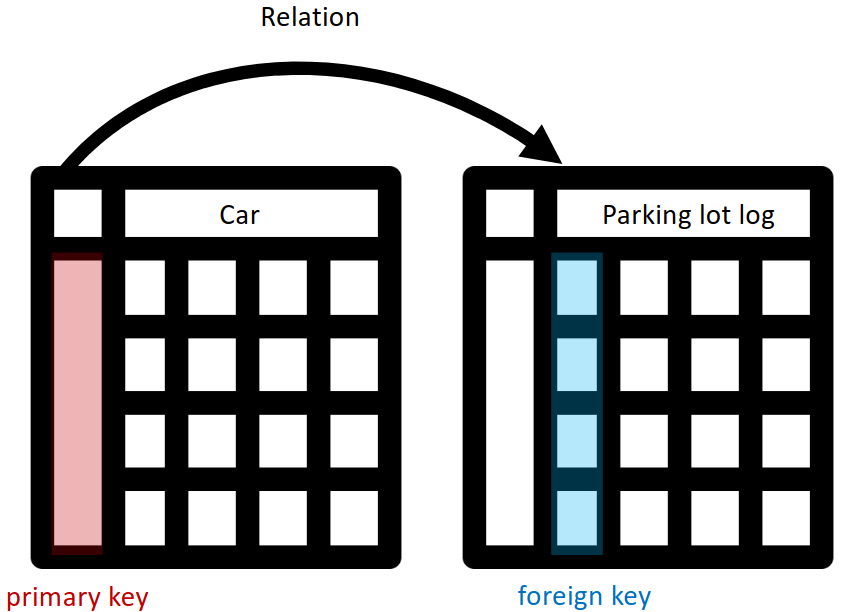
The keys in Relational Database.
Logical relation types
One-to-one
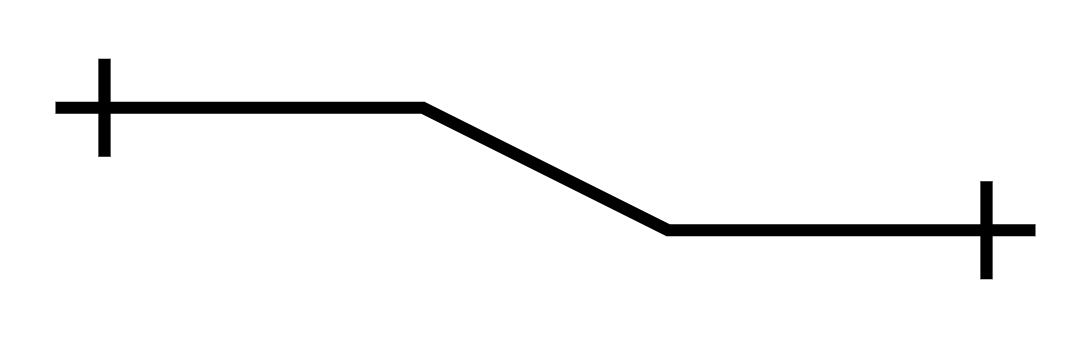
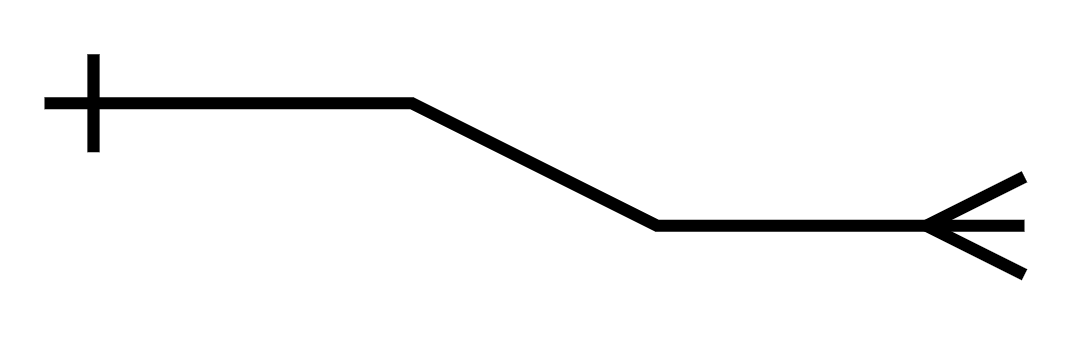
One-to-many
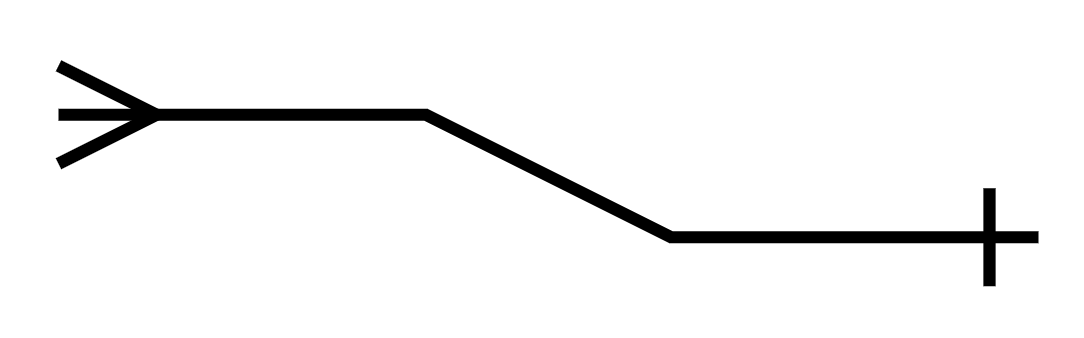
Many-to-one
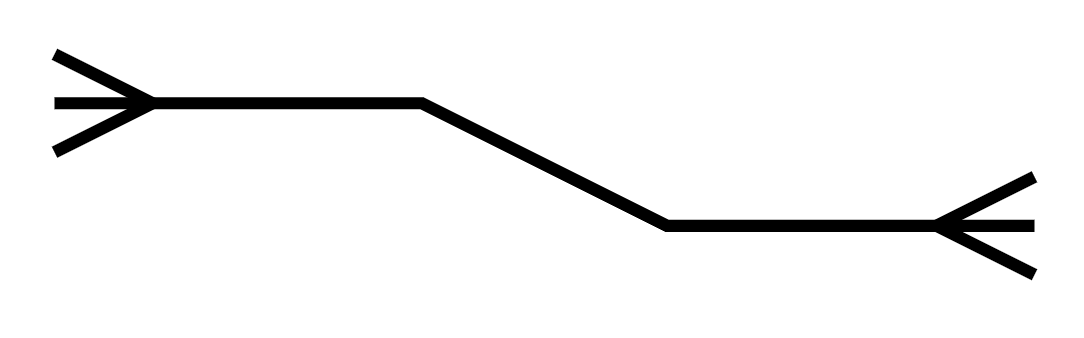
Many-to-many
One-to-one 
Every entity on the left can connect to one and only one entity on the right.
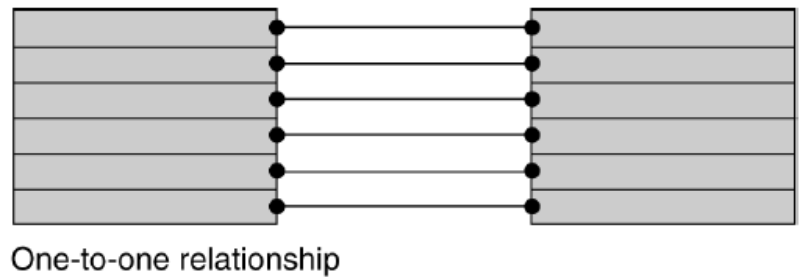
One-to-one demo.
One-to-many 
Every entity on the left can connect to multiple entities on the right. Every entity on the right can connect to one and only one entity on the left.
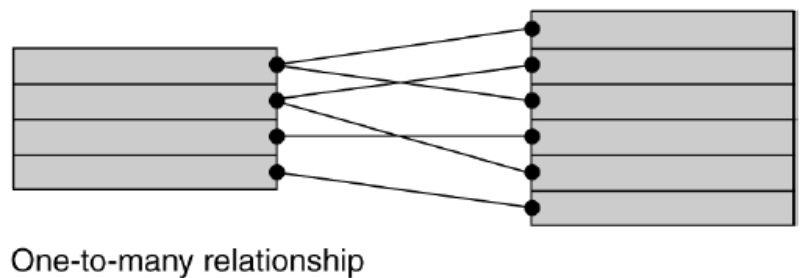
One-to-many demo.
Many-to-one 
Every entity on the left can connect to one and only one entity on the right. Every entity on the right can connect to multiple entities on the left.
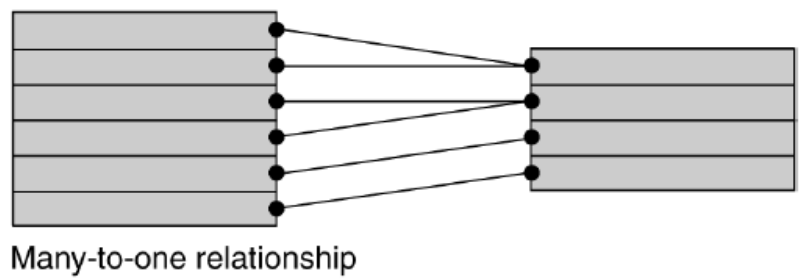
Many-to-one demo.
Many-to-many 
Every entity on the left can connect to multiple entities on the right.
Every entity on the right can connect to multiple entities on the left
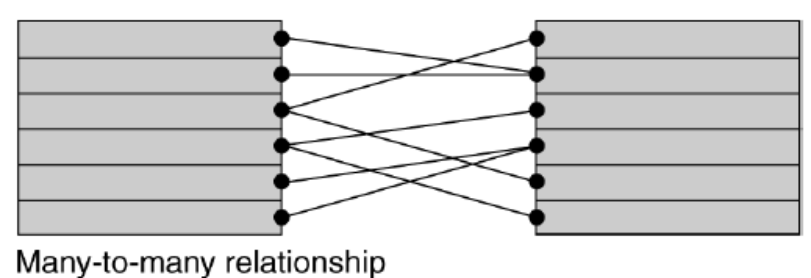
Many-to-many demo.
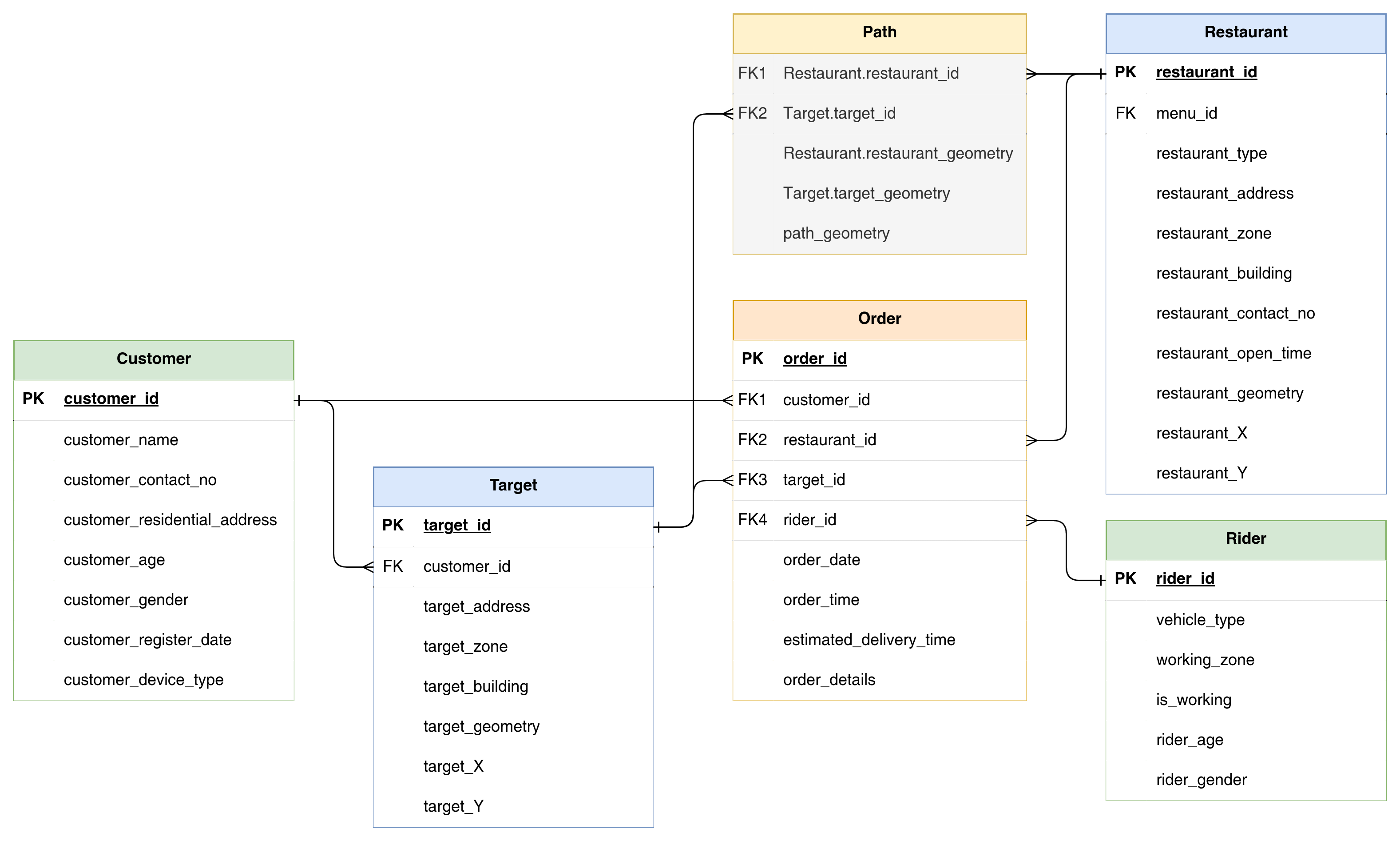
A database for food order & delivery system.
Advantages of Relational Database
Each table in the database can be prepared, maintained, and edited separately from other tables
This is important as more (GIS) data are being recorded and added
The tables can remain separate until a query or an analysis requires that attribute data from different tables be linked (joined) together, which is favorable to both data management and data processing.
Normalization: Preparing a relational database
Normalization is the process of decomposition, taking a table with all the attribute data, and breaking it down into small tables while maintaining the necessary linkages between them.
Objectives of normalization:
To avoid redundant data
To ensure that attribute data in separate tables can be maintained and updated separately and can be linked whenever necessary
To facilitate a distributed database
Demonstration of database normalisation
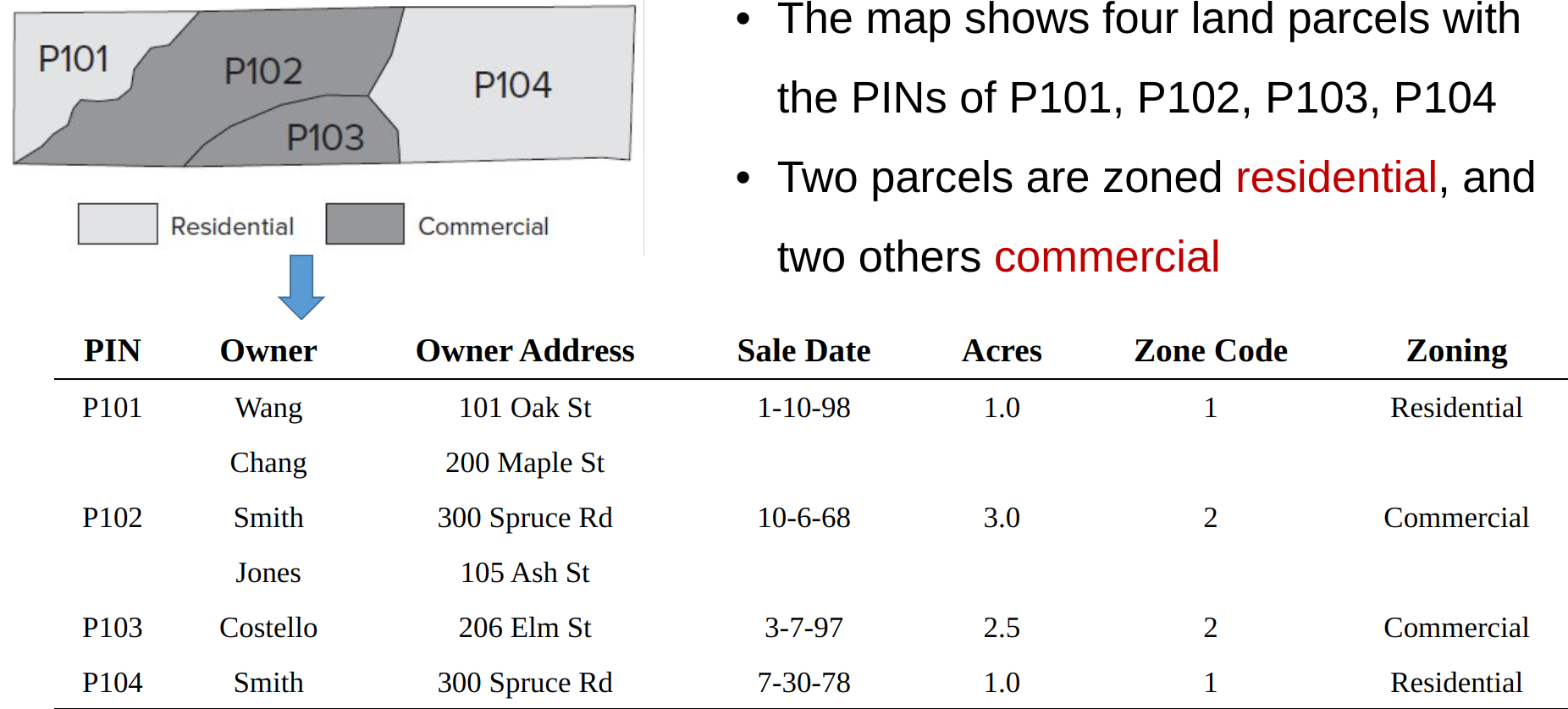
A demo table, before normalisation.
Step 0: Observation on the unnormalized table
Database Normalization is mainly to separate information from different types of entities to separated tables.
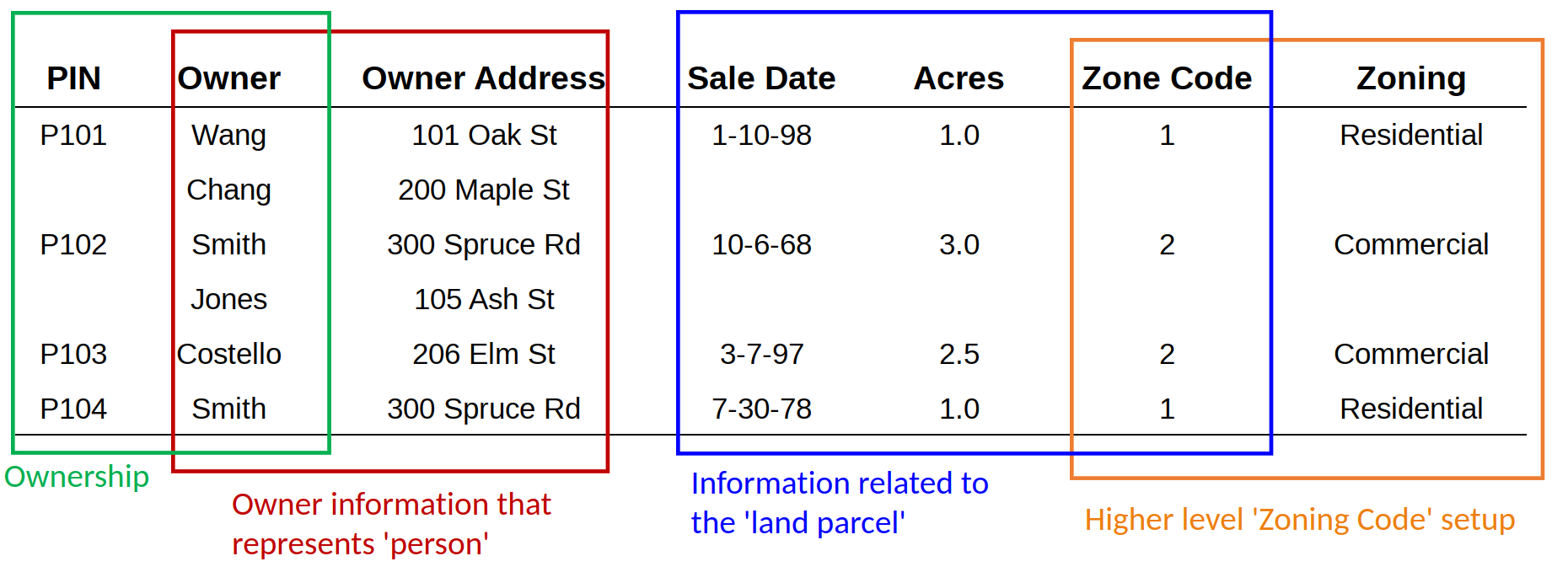
First step is to observe the composition and structure of the database: how many and what are the different ‘entity’ or ‘object’ in the table.
Step 1: Fill Missing Values
Step 1 fills the empty cells, and each cell has one value. But the problem of data redundancy has increased.
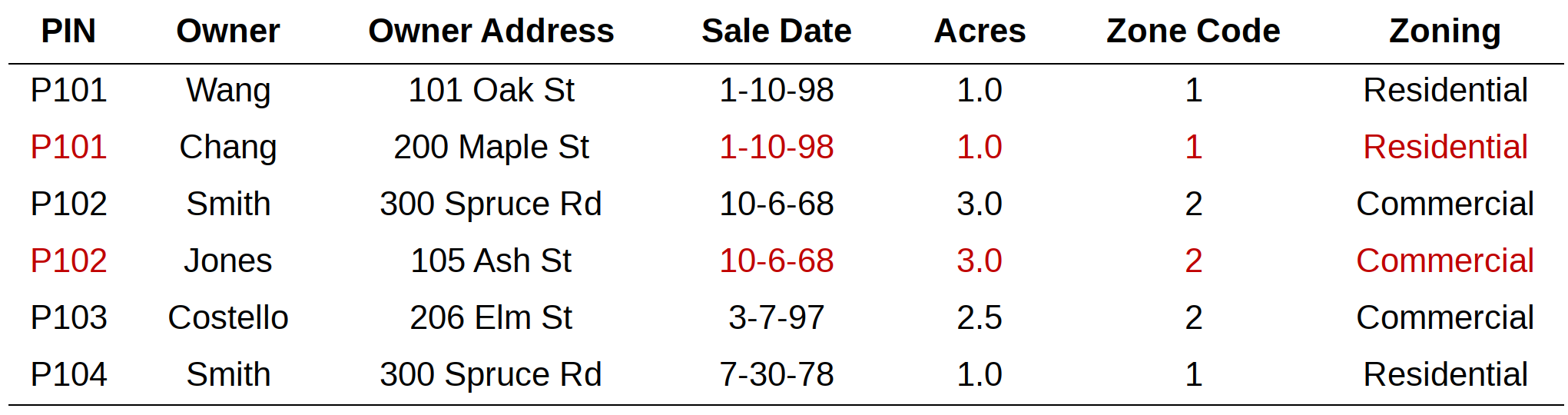
The original data may organised in an ordered way such that the repeated values are skipped if it is same as the one before.
Step 2: Table Decomposition
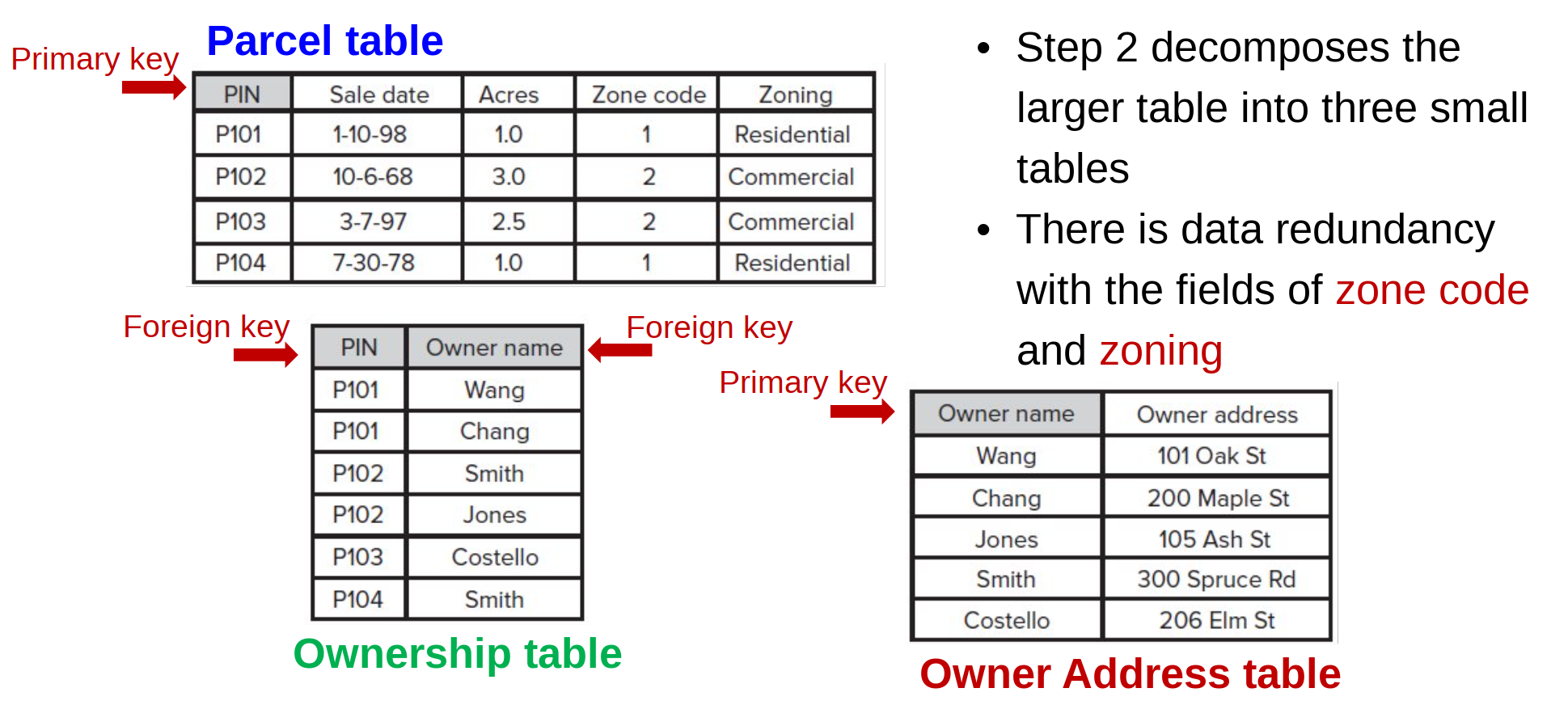
Decopmose the table. Still, there are one table with two types of ‘object’.
Step 3: Table Decomposition again
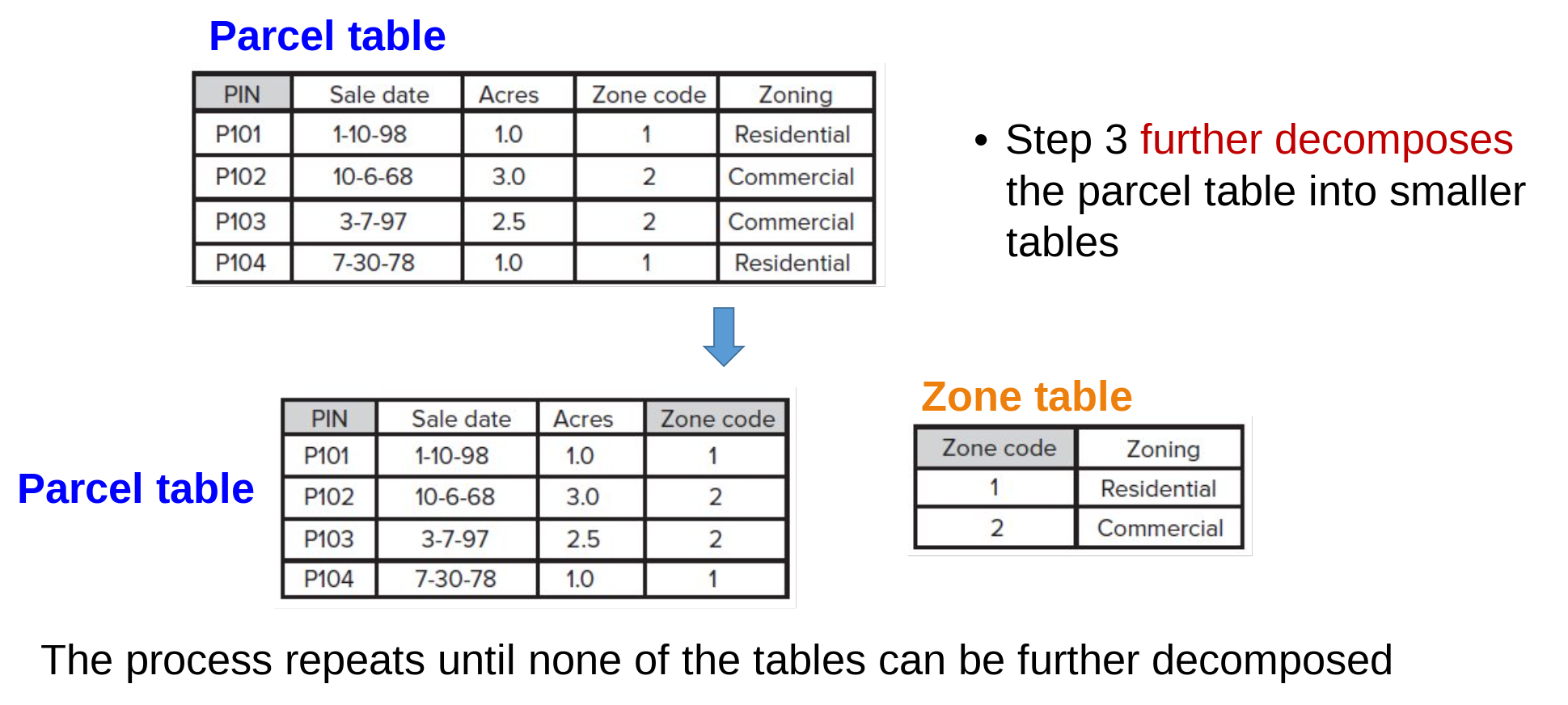
Keep decompose the table again, until every table only represent a single type of object.
Done Normalisation
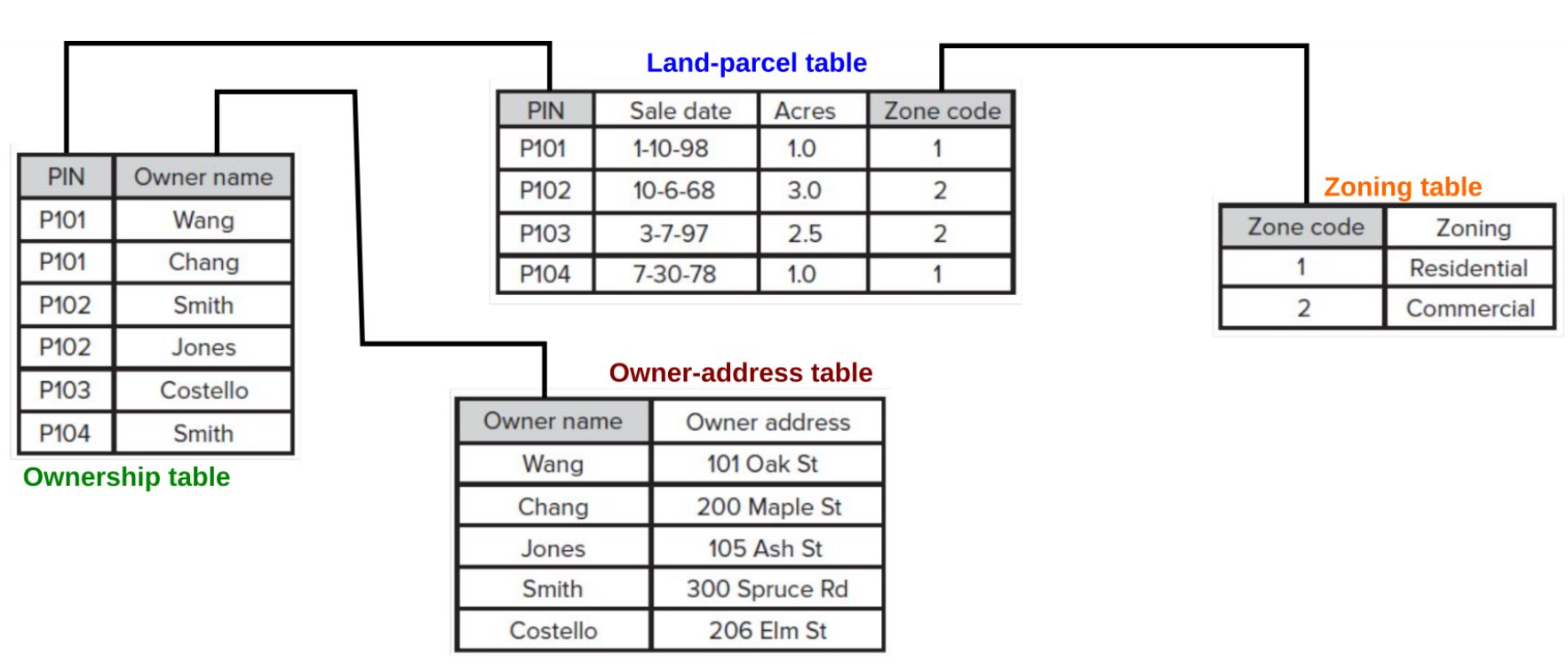
Finalise the table decomposition and the normalisation is complete.
Table join and relate
Since now the tables are separated and represent a single object, how to ‘combine’ them again for other data operation and usage? Table join and relate are the two frequently used database operation in GIS.
Table join
A join operation brings together two tables by using a common field or a primary key and a foreign key.
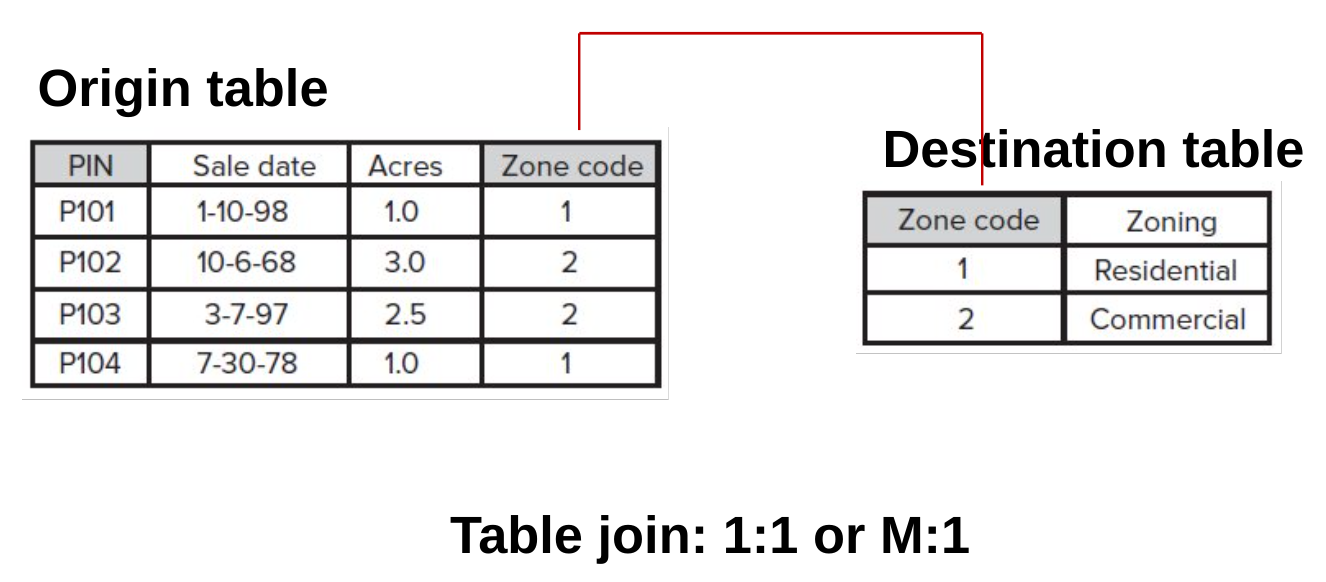
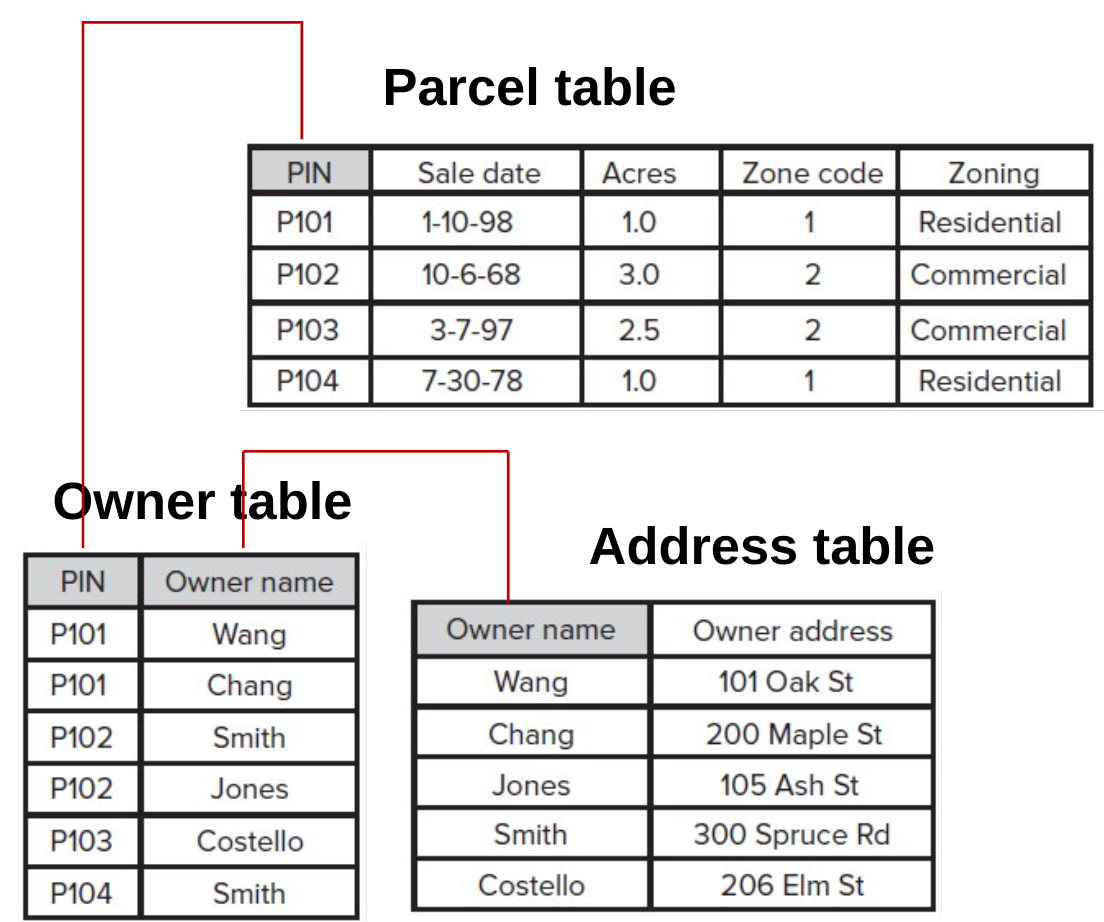
Table relate
A relate operation temporarily connects two tables but keeps the tables physically separate
Does not append the data from one table to another
Three or more tables can be simultaneously connected
Support all relationships
].column[
Comparison of Join and Relate
Join
Combines data from two tables into a single table or layer.
Most often used for one-to-one or many-to-one relationships.
Requires a common field in both tables.
Creates a static connection between tables (updates are not synchronized).
Appended columns are editable, but changes won’t reflect in the original table.
Relate
Establishes a temporary, dynamic connection between two tables or layers without physically combining them.
Allows for one-to-one, one-to-many, and many-to-many relationships.
Requires a common field in both tables.
Provides real-time access to related data (updates are reflected when accessing related information).
Allows for editing related data, but changes in the target table won’t be synchronized back to the original related table.
The Special of ‘Spatial’ in ‘Spatial Database’
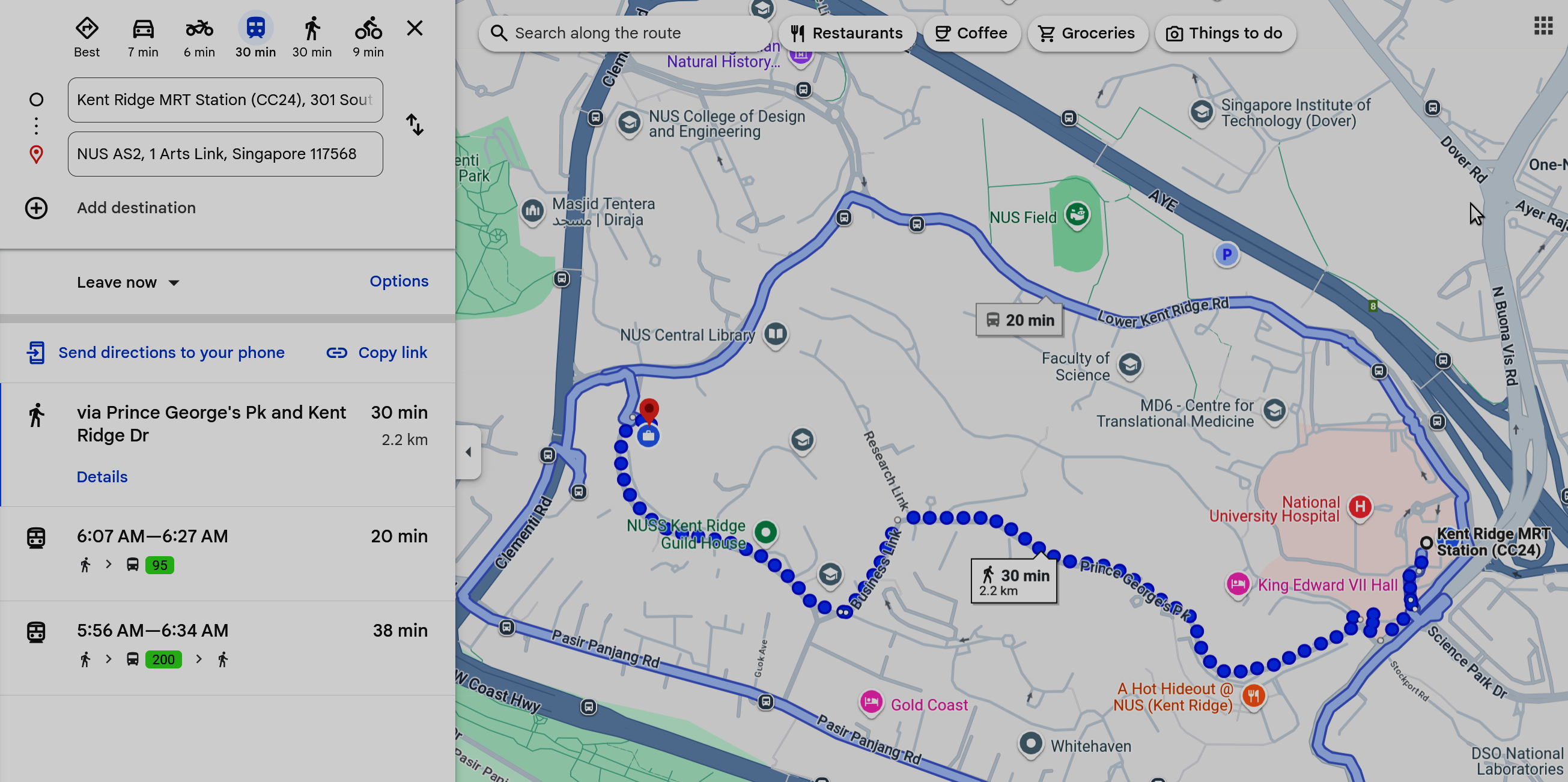
What about ‘spatial’ in spatial database? The location, proximity, and direction in Google Map.
Location: Spatial databases store and manage data with a geographical component, allowing users to associate locations with other attributes for enhanced analysis and visualization.
Proximity: Spatial databases enable proximity analysis, facilitating the identification of nearby features, calculation of distances, and exploration of spatial relationships between various data points.
Direction: With spatial databases, direction-based queries and navigation-based queries, enabling route planning, shortest path calculations, and network analysis to optimize movement and travel within spatial data contexts.
Spatial is indeed special!
Spatial join
A spatial join uses a spatial relationship to join two sets of spatial features and their attribute data.
In Figure 19:
(left) Join a school to a county in which the school is located
(center) Join a highway to a forest area by which the highway is intersected
(right) Join a villages to a fault line which the village is closest to
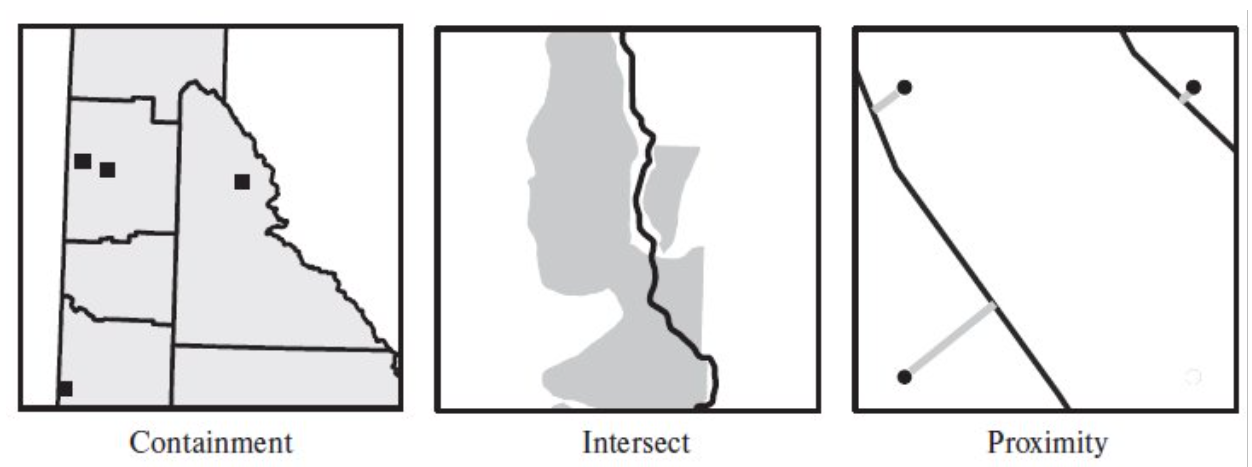
Figure 19:‘Merging’ (join/relate) table by spatial relationships.
Example of spatial database
PostgreSQL + PostGIS
Mysql + Spatial Extension
SQLite + SpatiaLite
DuckDB + Spatial Extension
MongoDB
CrateDB
Spatial Indexing
Operationaly, what is the addition of SPATIAL to the database?
Spatial indexing is a crucial and arguably the main component of a spatial database because it’s essential for efficiently querying large datasets of geographic or geometric data.
KD-Tree, QuadTree
R-Tree
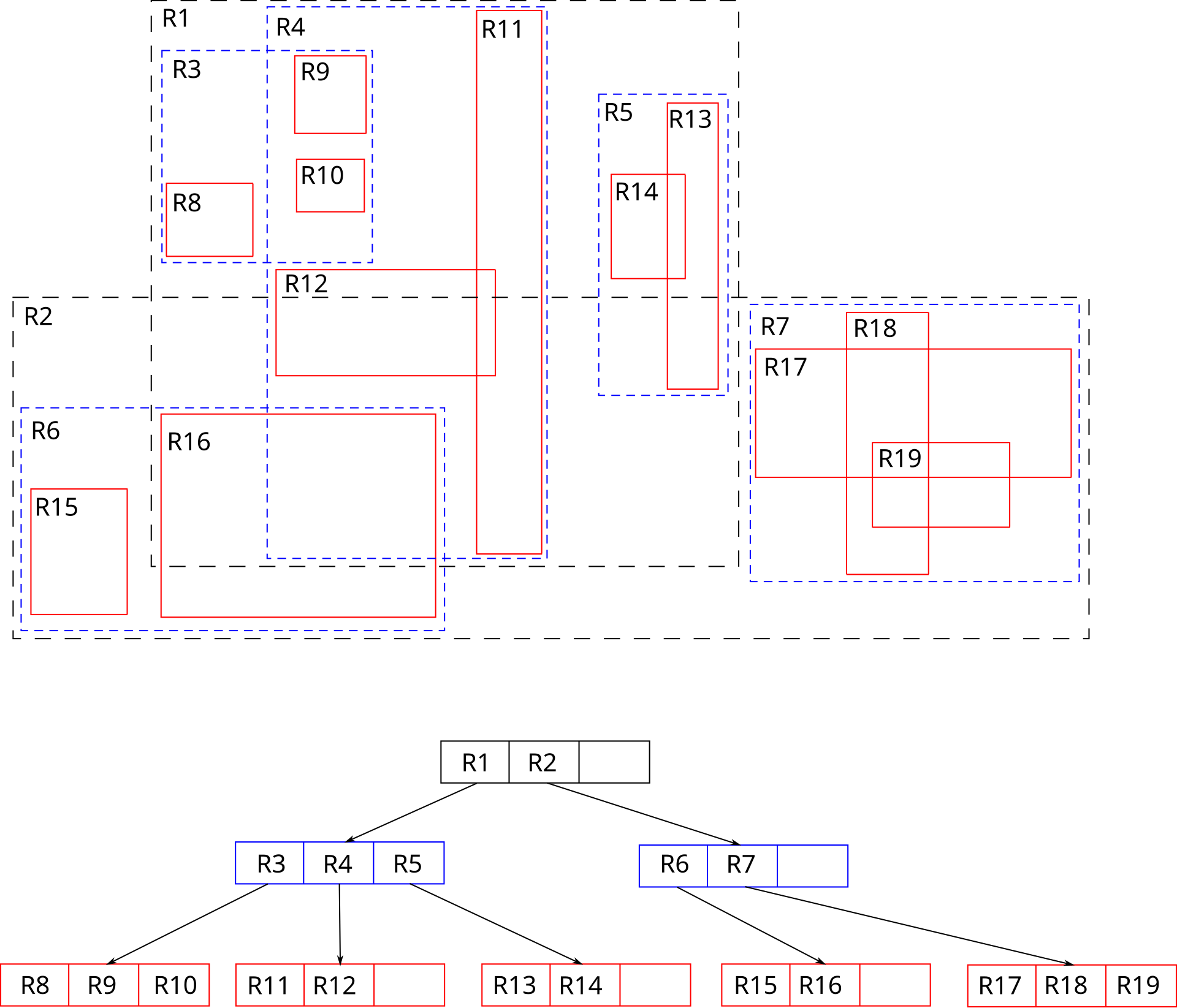
Image source: Wikipedia: R-tree
Example of spatial query (PostGIS)
Create table
CREATE TABLE public.cities (
    id serial PRIMARY KEY,
    name VARCHAR(255),
    population INT,
    geom GEOMETRY(Point, 4326) -- Point geometry, SRID 4326 (WGS 84 geographic coordinate system)
);
Insert data rows (point)
INSERT INTO public.cities (name, population, geom) VALUES
('London', 8982000, ST_SetSRID(ST_MakePoint(-0.1278, 51.5074), 4326)),
('Paris', 2141000, ST_SetSRID(ST_MakePoint(2.3522, 48.8566), 4326)),
('New York', 8419000, ST_SetSRID(ST_MakePoint(-74.0060, 40.7128), 4326));
Example of spatial query (PostGIS)
Finding cities within a search distance from a point
    SELECT name
    FROM public.cities
    WHERE ST_DWithin(
        geom::geography,
        ST_SetSRID(ST_MakePoint(-0.1278, 51.5074), 4326)::geography,
        100000 -- distance in meters
    );
Spatial Joins
-- Assuming another table 'countries' with a 'geom' column (Polygon)
SELECT c.name AS city_name, co.name AS country_name
FROM public.cities AS c, public.countries AS co
WHERE ST_Contains(co.geom, c.geom);
Do calculation (area)
SELECT ST_Area(ST_GeomFromText('POLYGON((0 0, 0 1, 1 1, 1 0, 0 0))', 4326));